
Introduction
The cables are an integral part of any modern house as people use various phones, computers, televisions, chargers, lamps, Internet devices, and many other electronic items that require cables. However, the presence of different wires in one place will create confusion and mess very quickly. Wires will get tangled in furniture, will get on the floor behind the desk, will accumulate dust, or will get tangled with other wires. Poor organization will be not only unsightly but also a possible danger when wires can be a tripping hazard or it might be hard to find the right wire when necessary.
Luckily, organizing cables at home does not have to be complicated or expensive. With the use of some simple items like cable clips, ties, labels, storage boxes, and adhesive organizers, you can manage to organize cables efficiently. It is enough to arrange wires depending on their function and purpose, put unnecessary wires aside and keep frequently used cables accessible. Even minor adjustments can change how your work desk, entertainment zone, nightstand, or kitchen looks.
Before organizing cables, it might be wise to clean out all the cables you do not need from this place and measure the length of the cable and plan the location of the device to avoid unnecessary loops. Cable must be arranged without sharp bends, tension, and unsafe connections.
In this article, I am going to provide you with some simple and effective tips on organizing cables at home. These tips will help to reduce unnecessary clutter, to ensure safety, make cleaning easier and to make your rooms look neater.
Cluttered electronics cords are among the most frustrating aspects in households that ruin the serene appearance of any room instantly. Apart from ruining the look of the room, messy cords provide a breeding place for dust bunnies, cause a tripping hazard for kids and even pets, and are a potential hazard to your expensive gadgets when pulled too tight. However, keeping your house in an organized state does not involve using advanced electronic skills or paying huge sums of money for a professional setup of your electronic appliances. A few simple cable management tricks can help you turn your messy entertainment centers, home office, and night stands into organized and secure zones without involving much effort. With the help of simple household items or cheap technology gadgets for organizing cables, you will be able to group, organize, and arrange wires in a way that they will not distract you and at the same time will be out of your eyesight. Arranging your power strip, bundling your computer wires, and routing your entertainment cords along the edge of the furniture will help you not only preserve your expensive gadgets from damages but also make future cleaning and upgrading process easier. No matter whether you like to solve this problem with your simple DIY life hacks or with help of commercial organizers, this is a very satisfying and efficient way of spending your weekend and improving your life conditions and your mood. Just spend one hour organizing cable nests in your room and you will immediately improve your life conditions significantly.
Identify Cables
In order to organize the cables properly, it is necessary to start with identifying what each cable serves for. In a home full of various electronic devices, it can become rather confusing to distinguish between charging cables, power cords, USB cables, HDMI cables, internet cables and other kinds of wiring. It will be beneficial to spend some time on identifying them because that will make the organization process easier. You can start with unplugging or checking each cable to see what device it corresponds to and then separate them into groups depending on their purpose or the device.
At the same time, it is also worth checking if all cables are actually necessary. Indeed, over time people may accumulate many extra chargers, various computer wires, damaged and unusable cables or various accessories for devices which have been long since gone. Keeping those unnecessary cables is rather pointless and can only contribute to more mess. Besides, it is important to check if any of cables are damaged because having exposed wires, cracked insulation or loose connectors can lead to various accidents.
After you identify the useful cables, you can move to labeling them so you could find them again in the future. Small adhesive labels, color stickers or pieces of masking tape would serve that purpose well. You can label cables as “TV,” “Laptop,” “Phone Charger,” “Router” or “Monitor.” If there are several similar cables, then color labels would help in differentiating them from each other.
As an additional measure, it would be useful to take a picture of complex connections before unplugging everything if you are dealing with a computer or an entertainment system. It will help to remember where everything should go. Identifying, sorting out unnecessary cables and labeling them first is a great start to keeping your cable arrangement clean and organized.
Cable Clips
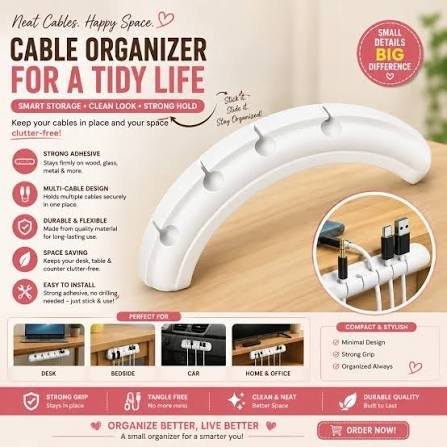
One of the easiest and most convenient cable clips can help organize your wires at home and create an attractive arrangement. Cable clips can be used especially effectively when organizing wires at desks, bedside tables, television sets, work stations, and any places where many cables will need to be run in the same direction. Using cable clips instead of loose and scattered cables will allow you to arrange the wires in such a way that they stay firmly at the edge of a desk, a wall, or any piece of furniture.
In order to organize wires using cable clips, you should determine the route for each of them and select the shortest, safest, and easily accessible option. Some types of adhesive clips can be fastened to a flat and dry surface, which does not require screwing or drilling. In case you have a number of heavy cables, you will either need to find more suitable clips or use another way to manage cables. The size of cable clips is very important because you shouldn’t put a lot of pressure on the cables.
It is also possible to use different clips for organizing various cable groups. Computer charging cables can be organized on one desk, while TV and gaming cables can be managed behind a unit. When there are several wires traveling along the same path, the clips will be able to arrange them and avoid tangling.
When using adhesive clips, you should make sure that all the surface is perfectly clean and the position for clips is properly selected. Clips should not be positioned in such a way that they interfere with opening doors or drawers or interfere with the air supply or any other moving parts. With a few affordable cable clips and careful planning, you can make messy wires more manageable.
Cable Sleeves
The cable sleeve represents a convenient way of handling several wires that are located close to each other. This device can be very helpful behind computers, televisions, entertainment systems, or desks as many wires can easily get tangled and become hard to handle. In addition, a cable sleeve represents the combination of several wires and helps to decrease clutter and improve the look of the area. Furthermore, it can make cleaning behind electronic devices more efficient as there will be no scattered wires.
Before wrapping wires into a cable sleeve, it is important to find those wires that should be wrapped and to check if they are long enough to go to their devices without stretching. First, it is better to disconnect all wires as it will simplify this procedure, although it is good to make a photo of complicated connections to remember where they should be after installation. After that, the wires should be divided and put together and placed in a cable sleeve depending on how it was designed. Cable sleeves are equipped with a zip, Velcro closure or flexible opening so that it is possible to remove and install them easily.
It is advisable not to include too many wires in one sleeve as the crowded bundle can be inconvenient and can restrict the airflow in front of electronic devices. Besides, it is important to pay attention to the fact that wires with signals and wires with power should be handled separately in case of many devices in this area. It is necessary to note that the sleeve should hold the wires comfortably but not to press their connectors or insulation.
There are many sizes and lengths of sleeves so that it is necessary to choose the appropriate size for the needed number of cables. Moreover, it is possible to use different sleeves for computer, television and charging wires. Therefore, using cable sleeves correctly, it is possible to organize a bundle of loose wires efficiently.
Labeling
Labeling wires or cables is quite an easy task but at the same time quite efficient. In case several wires look very alike and you do not see the difference between them, it might be quite confusing to determine which cable corresponds to the television, computer, printer, router, and phone charger. By using labels, it becomes possible to get rid of all these issues and avoid spending extra time looking for specific wire whenever you want to unplug something, move it or even replace it. It is especially efficient when wires go behind the desk or entertainment center.
The process of labeling does not require any special tools. You may simply apply adhesive labels, use masking tape or colored stickers or simply write everything you need to know about the cable or device using a permanent marker. You should write the name of the device you connect or its purposes on each label such as “Laptop,” “Monitor,” “TV,” “Router” or “Phone Charger.” If you have more than one wire connected to the same type of the device, then you can use some colored labels. For example, one color may mean computer equipment and another color means entertainment devices.
You should stick the label near the end of the wire where it is plugged into the device or power source. It will help you to easily determine what cable it is without the necessity to follow the entire wire through the bundle. If you have wires which are rather difficult to differentiate from one another, then you may even label two ends of such wires to know where they are connected. Labels must be attached securely without interfering with the connector.
Besides, it will be better if you will update your labels from time to time. In case any device is replaced or some cable is not used anymore, then you should remove the label instead of accumulating more and more confusion.
Desk Organization
The area on the working surface may easily get messed up with a bunch of charging cords, power cords, USBs, headphones, and all sorts of computer peripherals lying nearby. Correctly organizing your cables may help to not only organize the space but also make a more comfortable working environment. First of all, remove all items from your desk and find out which cords are necessary. All unused or broken cables should be stored somewhere else in order not to use up the space on the table.
Afterwards, design the routing of those cords that you use regularly. Place all charging cords and other wires closer to the edge of your desk in order to be able to access them conveniently. You may attach the cable clips underneath or at the back edge of your desk in order not to fall them down every time you need to unplug some appliance. In case there are several cords going to the same direction, tie them with reusable cable ties or put them in cable sleeve.
It is always useful to store the power strip somewhere in a convenient place. Instead of leaving it right on the floor, where dust might accumulate around it, you might want to place it under the desk with a help of a proper holder or mounting system. It should be accessible and not be covered by any kind of clothes, papers, or other things. Also try not to cram too many plugs in one place and follow the guidelines of the manufacturer.
It might be useful to separate all the cables according to their function. Put all computer cables in one section and phone chargers, speakers, and other peripherals in another one. It would also be handy to mark some cords in case they look alike.
At last, always keep some extra space in cables for convenience.
Safety Tips
Cable management should not only make your home more aesthetically pleasing but also contribute to safety. Unruly and untidy wires could serve as a potential trip hazard as they run through walkways, doorways, or wherever there is constant traffic in a house. You should try to run your cables along walls, behind the furniture, and under the desk rather than letting them scatter about. Cable clips, sleeves, and ties could secure cables and prevent a person from getting their feet caught in cables.
It is necessary to check all cables before managing them. Make sure the cable insulation is intact and not damaged, wires do not protrude from the casing, connectors do not get deformed, and there are no signs of burning. A cable that is damaged cannot just be tucked in a sleeve or bundled up with other wires. It should either be replaced or repaired by an electrician. Try to avoid using any damaged chargers and power cords as they might cause a hazard.
Avoid sharp turns and bending of wires, pulling them too tight, and putting furniture on top of them. Too much pressure might cause insulation damage or even harm the wiring inside. When securing wires, you should use reusable ties or clips that would fit them and not be tightened so much that they squeeze wires. There should be enough slack at connectors so they won’t be damaged when moving the device.
Extension cords and power strips need careful handling. You should not overload them with more devices than it was intended and avoid linking several extension cords together. Electrical connectors should be protected from water and wet conditions, especially in kitchens and bathrooms.
Lastly, you should choose cable-management products that are compatible with the surface and wire types you intend to use them with. You should also avoid blocking ventilation openings on electronic devices and keep important plugs reachable in case they need to be unplugged. These small steps will help you to organize your cables safely and effectively.
Explore this related topic here:
7 Easy DIY Home Projects for Beginners
DIY Storage: 9 Easy Ideas for Small Homes
10 Amazing Home Organization Ideas for Small Spaces
Electrical Safety: 7 Common Mistakes to Avoid at Home
Conclusion
The proper arrangement of cables in your apartment will not require too much time and effort, but the result will bring you many conveniences. The mess of cables makes your workplace, entertainment area, and charging station dirty and untidy. Moreover, poorly arranged cables are a potential source of damage to your electronics, as well as danger in case if you or your family members have to run through the area. Therefore, the proper arrangement of cables can improve your living conditions significantly without spending too much money on it.
Identifying the necessary and useful cables, getting rid of old and damaged wires and labeling the useful ones will help you a lot in future. Cable clips will hold separate cables in place while the cable sleeve will help you organize several cables in one bundle. This way, you will save some place for cleaning and avoid the mess.
Proper organization of your desk will help you a lot as well. Storing frequently used wires close and putting longer cables behind or under your desk will make your workplace much more comfortable. But in any case, it is essential to pay attention to the safety when organizing the cables. Do not use damaged cables, do not bend cables sharply, do not use overloaded power strips, do not put cables where someone may trip over them and put the electrical connection far from water and allow ventilation.
All you need to organize your cables properly is some labels, clips, sleeves, and reusable ties. Proper planning will help you keep them arranged for a long time. In order to make the situation better, take some time once a week to inspect your cables and get rid of unnecessary wires.